Chains and the route map
Two views of the dashboard: what one trigger caused, and what the factory is wired up to do.
Chains
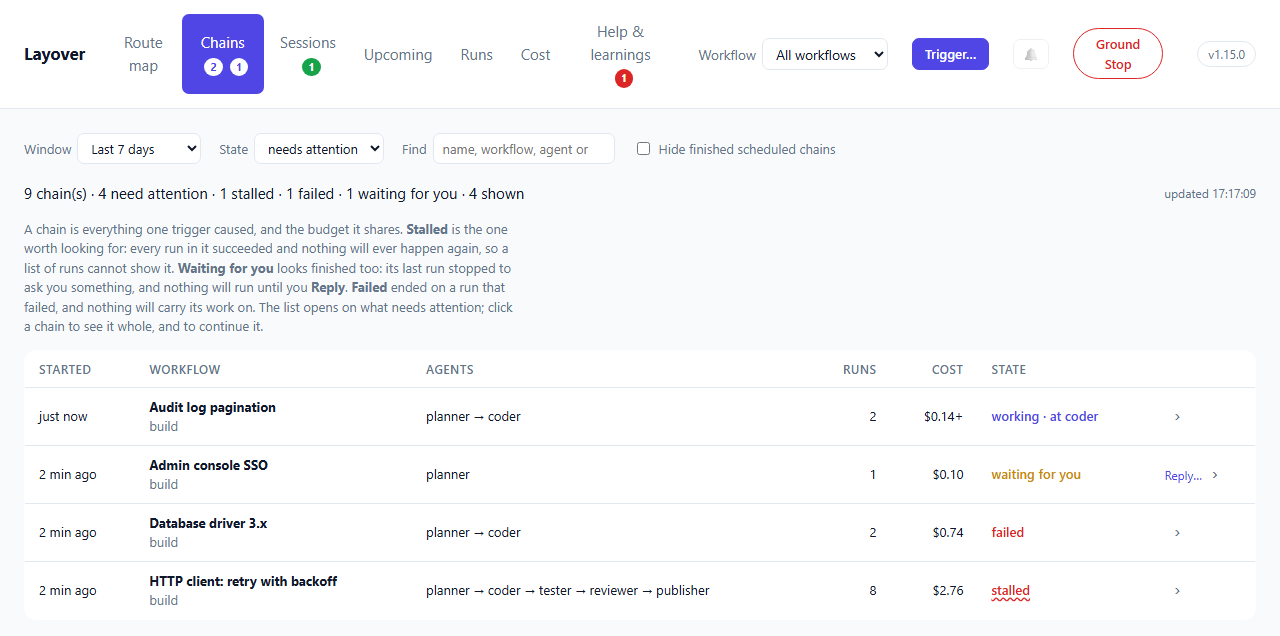
A run is one agent doing one thing. A chain is everything one trigger caused, and the budget they share — Hops, Fuel and the run cap are per chain, so "what did this cost" and "did this finish" are questions about a chain rather than a run. A chain somebody named when they triggered it is listed by its name, above its workflow.
| State | Meaning |
|---|---|
working | Something is running, or waiting to |
finished | It ran and stopped, and nothing is outstanding |
stalled | It stopped and nothing will ever happen again |
waiting for you | Its last run stopped to ask you something, and nothing will run until you answer (awaiting_human) |
failed | Its last run failed, timed out or was interrupted, and nothing is queued or running after it |
halted | A Ground Stop caught it, or the Reserve refused to start its run |
waiting for you looks finished too. Every run in it ended cleanly and nothing is queued —
because its last run filed a fatal help request and stopped. It has a Reply… beside it and an
amber count on the tab. Resolving the request without replying makes it finished; replying makes
it finished, continued by the chain the reply started.
failed is a chain that simply stopped. The run that would have sent the work on did not
finish — its tests failed, the model service dropped it and it was not restarted, it ran out of
time — so nothing is queued, nothing is stalled at a barrier, and no rail refused anything. It used
to read as finished, which is how three chains once sat dead overnight until somebody asked why a
pull request never appeared. Its detail says which run ended it and why:
`wolf` failed, and nothing came after it: exited with code 1: the model service failed (http_400):
… ; not restarted: this agent's `recovery` policy is `manual`; a human decides
"Last" is the run that finished last, so a fan-out branch that failed while another went on to the
end does not make the chain failed. A chain whose run the model service ended and whose restart
is waiting out its back-off is working, and says so. A chain somebody has continued —
Continue… on its page — has been dealt with and is finished.
Dismiss… is for a stalled or failed chain somebody dealt with another way — the fix made by
hand, the work no longer wanted — so it stops asking for a person without anything running again.
It is beside such a chain in the list and on its page, and asks how it was dealt with and who you
are, both optional. The chain keeps its state, because that is still what happened, and reads
failed · dismissed, greyed, with Dismissed by karl · 2 h ago: merged the fix by hand on its
page. It leaves needs attention, the red count on the tab, the count in the page's title and the
notifications. Undo dismiss on its page puts it back.
A dismissal is of the run the chain ended on. If the chain goes on — restarted, say — and ends on another failed run, or stalls again, nobody has seen that, and it needs attention again. Dismissals are kept with the journal, survive a restart, and go when retention removes the runs they were about.
Continue…, on a chain's own page and in a run's report, opens the trigger window with that workflow chosen and its flags set as that chain had them, saying where they came from. Change them if you need to. A chain from before runs recorded their flags opens with the workflow's defaults, and a warning that they are only that.
stalled is the one worth looking for, and the reason this view exists. A joined agent never
woke because the barrier it was waiting behind could no longer be completed — the tester reported,
the reviewer never did, and the publisher is still waiting for a verdict that is not coming.
Read as a list of runs, that chain looks perfect. Every run says succeeded. There is no failed
run to point at and nothing saying the last step never happened. So the Tower writes down the
moment it gives up on a rendezvous, and this is where that shows up:
`publisher` never woke: nothing live could still deliver reviewer
A cost with a + after it is a floor rather than a figure: some run in the chain reported nothing,
so the real total is at least that much.
A chain is listed from the moment its first flight is queued. Trigger a workflow while every slot
is taken and it reads working · queued, with no runs yet, rather than not appearing until a slot
frees; one that is going says where it is — working · at coder. Click a chain — anywhere on its
row; the › at its end says so — to see it whole.
Finding a chain
A factory with a few schedules starts hundreds of chains a week, almost all of them routine work
that finished. So the list opens on what needs attention — working, waiting for you,
stalled, failed and halted, less any somebody dismissed — and says how many it is not
showing: 864 chain(s) · 3 need attention · 1 failed · 2 dismissed. The red count on the tab is the
stalled and failed chains nobody has dismissed: the ones nothing will move again by itself.
When nothing does, it says so, with a link to show every chain.
| Filter | Narrows to |
|---|---|
| Window | Chains started in it |
| State | needs attention (the default), any, or one state. A dismissed chain is listed under its state, not under needs attention |
| Find | Chains whose name, workflow, agents or identifier contain the words |
| Hide finished scheduled chains | Leaves out a schedule's chains that nobody named and that finished: the routine ticks |
The list is drawn fifty at a time, with Show more below it; a refresh keeps however many pages were open.
One chain, whole
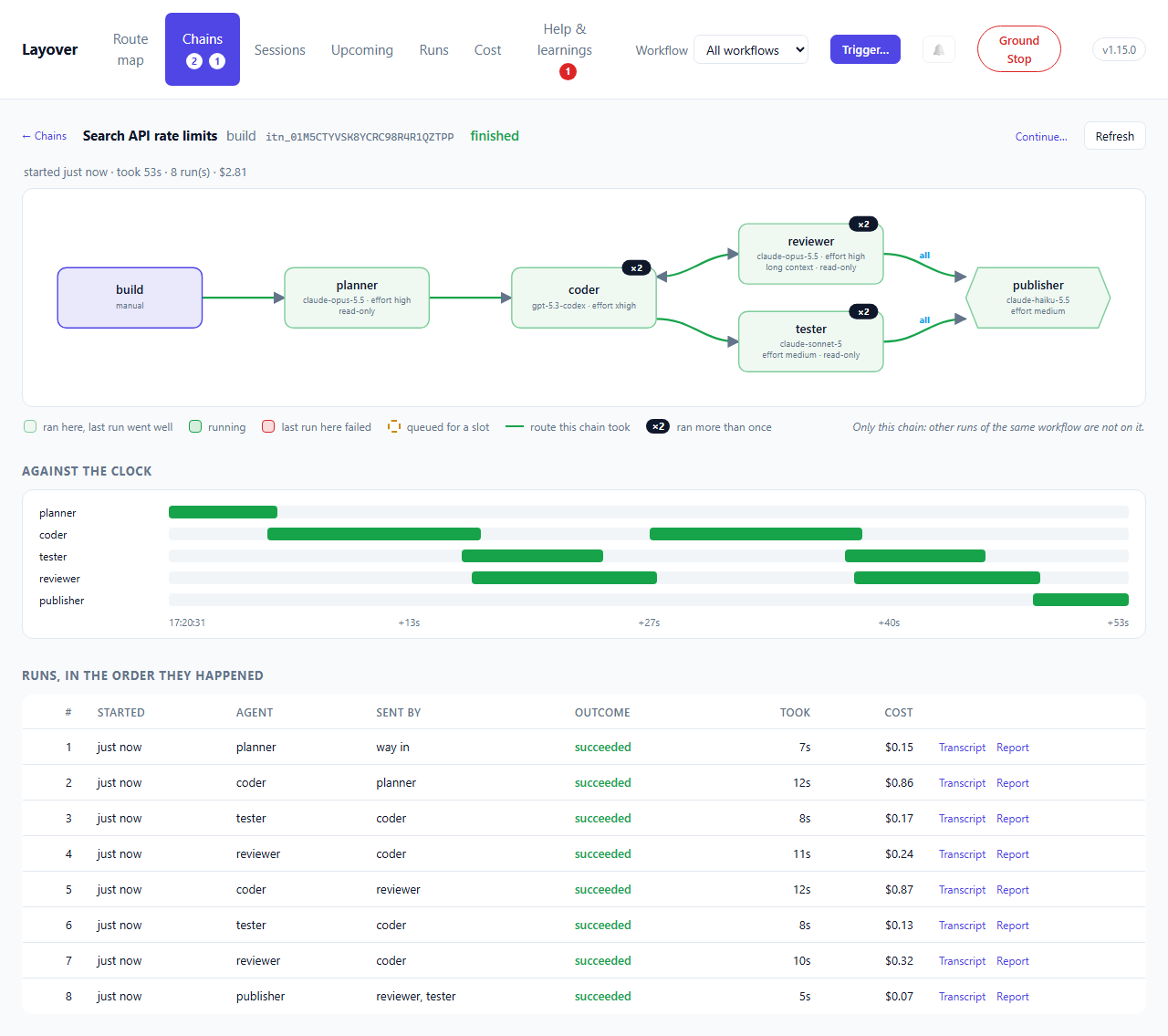
Trigger a development workflow three times and its route map is still one drawing. It colours the coder while any of the three runs it, so it says that the coder is running and not which of the three is where. Opening a chain — from Chains, from a run's chain in Runs, from the buttons under its workflow's map, or straight after triggering it — shows that chain on its own:
- Its workflow's map, drawn for it alone. The same drawing, so the two can be compared at a glance, coloured by what happened in this chain, with the routes its work actually took drawn in green and the rest faded. Each box says what its agent ran at in this chain: what its runs were recorded running at, or what was chosen when the chain was triggered — which can differ from the workflow's own map.
- The flags it ran with, as chips: those on, and any off that its workflow has on by default.
A flag set otherwise than its workflow's default is marked
•— that is what somebody chose when they triggered it — and the rest, off as by default, are counted rather than listed. - Against the clock: a row per agent, each run a bar on one time axis from the chain's start — green, red for a failure, pulsing while it runs, a dashed outline for work waiting for a slot. What the list cannot show is plain here: which runs overlapped, how long work waited, and which pass took three times as long as the one before. Click a bar for its report, or to watch it.
- Every run, in the order it happened, with who sent it, how it ended, how long it took and what it cost, and Watch or Transcript and Report beside each.
- What it is waiting for: flights it has queued, at the end of the list.
| Drawn as | Means, in this chain |
|---|---|
| Pale green box | It ran here, and its last run here went well |
| Green box | It is running now |
| Red box | Its last run here failed, timed out, was interrupted or was halted |
| Dashed amber outline | Work for it is queued, waiting for a free slot |
| Faded box | Nothing in this chain reached it |
| Green line | A route this chain's work took |
×2 in a corner | It ran twice here — the coder on its second pass after a review, say |
The view keeps itself current every few seconds while the chain works, and stops asking once it
has stopped. Its address ends #chain=itn_…, so it survives a reload and can be sent to somebody.
Sent by says where each run's work came from: an agent, the way in (a trigger, a schedule or a
resumed layover), or — when that was not recorded. Runs from before this release, a join restarted
after the Tower that released it went away, and a run the Reserve refused do not know, and they
light no route rather than a guessed one — a route drawn from who happened to run before would look
exactly like one that was taken.
What it cannot show is a flight parked at a barrier: that lives only in the Tower's memory. The upstreams that have reported show as done, and the joined agent wakes when the last arrives.
The route map
flowchart LR
  p["pipeline"] ==> a["analyst"]
  a --> b["investigator"]
  b -- all --> c{{"developer"}}
  a -. bypasses .-> c
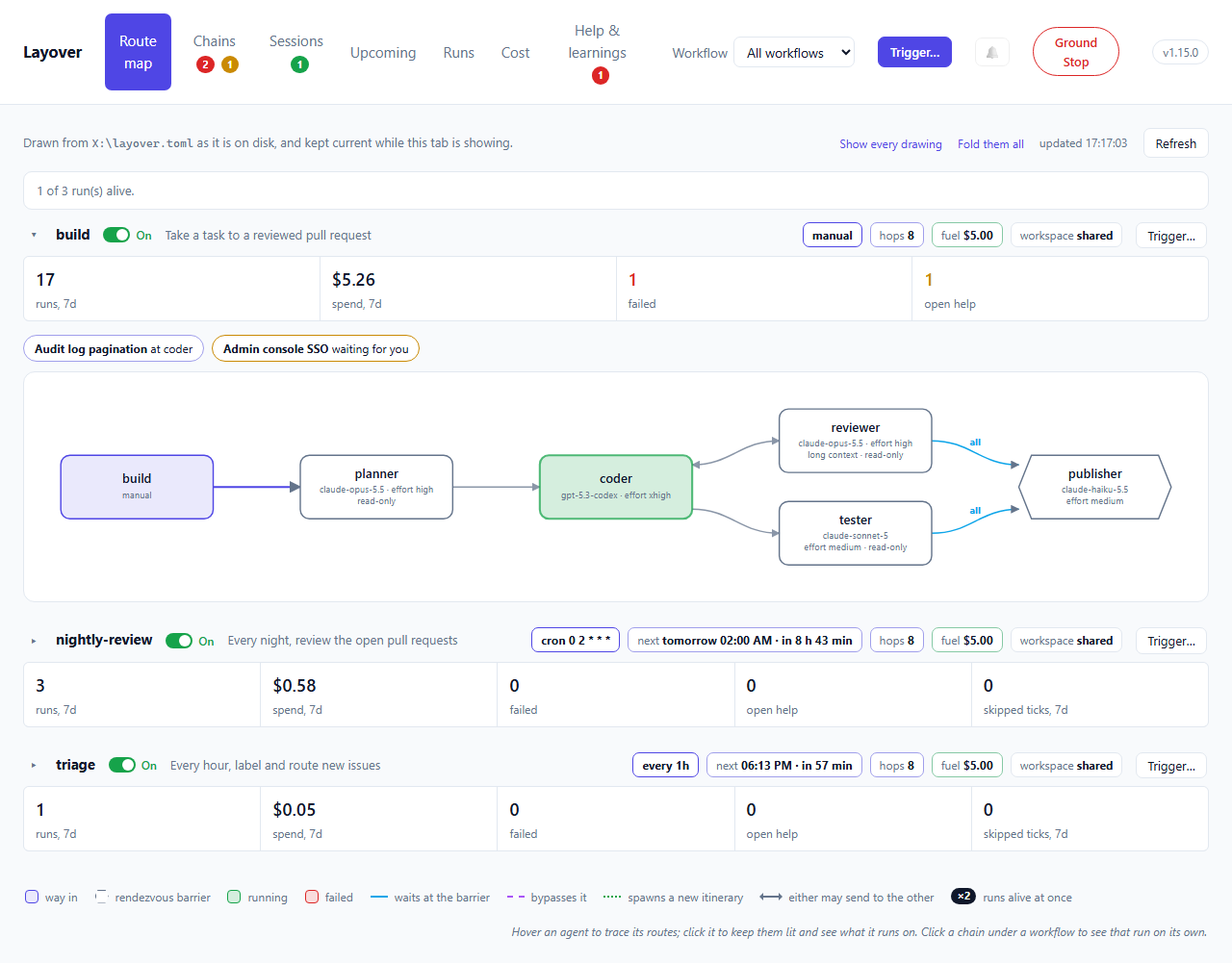
Read it as: pipelines on the left, work flowing right, each agent in the column where it comes in the work.
Columns follow reading order, and the order you declare routes in shapes them. Layover walks
the route map depth-first from the way in, visiting each agent's routes in the order layover.toml
lists them — routes as written, each route's to in order. A route back to an agent the walk has
not finished with closes a loop and is drawn as a route back; each agent then sits one column
right of the furthest thing that wakes it. A factory lists its routes roughly in the order its work
flows, so a workflow with shortcuts and loops still reads along its main path: an analyst allowed
to send straight to the operator for a rare message does not pull the operator into the analyst's
next column. Reorder the routes and the map changes; nothing the factory does changes with it.
Columns are therefore not hops. Hover an agent for its hop depth, measured exactly as
layover validate measures it: 1 hop from devforge's entry: woken by flight 2 at the earliest.
On the whole-factory map every pipeline's entry starts the walk, by pipeline name, then every agent
triggered directly; an agent two workflows reach at different depths takes the deeper column, and
a spawn that closes a loop with another workflow's routes is drawn as a route back like any other.
| Drawn as | Means |
|---|---|
| Rounded box | An agent |
| Hexagon | An agent guarded by a rendezvous barrier |
| Thick indigo arrow | A pipeline feeding its entry agent |
Blue arrow labelled all or any | An upstream the barrier waits for |
| Dashed violet arrow | A permitted sender the barrier does not name |
| Line with an arrowhead at each end | A route each way: either agent may send to the other |
| Line running across a column, between its boxes | A route that skips columns: it crosses each one at a height kept clear for it, and never through a box |
| Short line or arc beside a column | A route between two agents in the same column |
| Line under the columns it spans | A route back towards the way in: out to the right of its column, along a lane of its own just below the columns it spans, and up into the agent it returns to |
| Arrow labelled with pipeline names | A route only those workflows' chains may use — on the whole-factory map only |
| Green, amber, red fill | Running, waiting at a barrier, last run failed |
×2 in a box's corner | Two runs of it alive at once — the workflow triggered twice, say |
Amber needs the supervisor: nothing records a parked barrier yet, so today the map shows running and recently-failed agents only.
A workflow's map is coloured by that workflow's runs. An agent it shares with another workflow is
not shown running here because the other workflow is running it; a run whose chain no workflow
opened — a review spawned by a sweep, say — could be anybody's, so it counts on every map its agent
is drawn on. Under the map, one button per chain the workflow has going says where each is —
46TNEG at coder, GDTHVD queued for analyst — and opens that chain.
That dashed arrow is the one worth dwelling on. A barrier constrains only the upstreams it names; any other permitted sender wakes the agent directly and leaves the parked flights untouched. In the reference factory the analyst's work item reaches the developer that way, while the tester's and the reviewer's verdicts queue at the barrier — which is what lets one agent be both a join target and an ordinary destination.
Most routes in a real factory come in pairs — an analyst asks an investigator and hears back — so a pair of plain routes is drawn as one line with an arrowhead at each end. Only plain routes are paired: a join, a spawn, or a scope that differs between the two directions says something the other direction does not, so each keeps its own arrow. The review loop into a barrier, for instance, is still drawn out and back.
What each box says
Under an agent's name is the model it runs on and the reasoning effort it runs it at, and
under that its context tier and whether it is read-only:
             bob
claude-opus-5.5 · effort xhigh
        long context
The model and its effort share a line because they are one choice: how hard that model is asked to reason. A model name too long to share its line puts the effort at the start of the next, and a box grows a third small line rather than cut anything off.
All of it is read from the command line Layover will run for that agent — its runner's command,
with the agent's own model, effort and context filled in — so two agents sharing one runner
each show their own, and a value fixed in the runner is shown as readily as one the agent
declares. See what is reported for which flags are read. An
agent whose command line names no model or effort is drawn as it always was.
Hover over a box for the rest: its description, runner and access. GET /agents reports the same
model, reasoning_effort and context for each agent.
Tracing one agent
A busy map is easiest to read one agent at a time. Hover over an agent — or tab to it — and its
routes and the agents at their other ends stay lit while everything else fades. Click it to
keep them lit; a panel opens under that workflow's map with what the agent runs on (model,
effort, context tier, runner, access) and who it sends to and hears from in this
workflow, with a link to its runs. Click it again, click empty space, or press Escape to let go.
Hovering a single route lights just that route and its two ends, and its tooltip says what it is:
analyst ⇄ sherlock, or azurix → eagle · spawns a new itinerary · only in eagle-eye.
"In this workflow" is exact: the panel reads the routes drawn on that workflow's map, which are the routes its chains may use, so an agent shared by two workflows shows different neighbours in each.
One diagram per workflow
A factory usually holds several pipelines, and they are genuinely separate workflows. Drawn together they read as one very confused process, so each gets its own diagram, stacked down the page — or just the selected one, when the header narrows the page to it. Every diagram is drawn at the same scale, its natural size, so a workflow of three agents is not blown up to look more important than one of twelve; a diagram wider than the page shrinks to fit, and past a point the page scrolls it rather than shrinking its text out of reading.
The busiest workflows come first — chains under way, then runs in the last week, with the order
of layover.toml breaking ties — and the order holds while the page refreshes itself, so a card
does not move while you read it. A factory of five workflows is five drawings tall, so a drawing
folds away (▸) to its card: the header, the week's numbers and the chains under way stay.
On a page of three or more workflows, one starts folded when nothing in it needs looking at —
nothing under way, nothing failed, nobody asked anything — and Show every drawing and Fold
them all do what they say. A drawing you fold or open stays that way in this browser.
Above each diagram is what that workflow has actually been doing: runs and spend over the last seven days, failures, open help requests and, for a scheduled workflow, the ticks it skipped. The diagram says what may happen; the strip says what did, and both questions get asked at the same moment by someone who has just opened the page wondering whether anything is wrong.
Each carries the rails that bound a chain started there:
| Rail | What it bounds |
|---|---|
| next | Not a bound: when a scheduled workflow next fires, by the Tower's clock. See What starts next. |
| hops | Depth. Flights before the chain is cut. Branches inherit the count rather than splitting it, so it says nothing about width. |
| fuel | Breadth. The shared budget, honouring the entry agent's own fuel_usd where it sets one. |
| workspace | Whether two instances share a working directory or get one each. |
Both rails are shown together deliberately. Seeing Hops alone invites the assumption that it caps
spending, and it does not — a branching factor of three at max_hops = 8 permits thousands of
paid invocations while every hop count stays legal.
An agent belonging to two workflows appears in both. That is the honest answer: the developer really is in the triage pipeline and the follow-up pipeline, and hiding it from one would misrepresent the factory to make a tidier picture.
Each diagram is drawn over the routes that workflow's chains may use: every global route, and every route scoped to it. A route scoped to another workflow is not drawn, and an agent only another workflow's routes reach does not appear. So a shared agent appears in each workflow with only that workflow's edges — the review sweep's map does not show the reviewer handing work to the builder when only the build workflow may. In a factory with no scoped route, every diagram is exactly what it was.
The whole factory in one picture is GET /graph without a pipeline, or layover graph. There
every route is drawn, and an edge only some workflows may use is labelled with their names — in
the SVG it carries a scoped class and an "only in …" tooltip. The page itself keeps to one
diagram per workflow, for the reason above.
Cost gains a By workflow table for the same reason. Per-agent totals cannot answer "what does the nightly sweep cost me" once an agent belongs to more than one.
The diagram is generated per request, so an edit to layover.toml shows on the map within fifteen
seconds, or at once on Refresh. layover graph prints the same graph without a server: Mermaid by default for
pasting into a README, --svg for the version the dashboard draws, and --pipeline for one
workflow's diagram.